The one thing that matters more than brand or price: a Kindle case is built for one exact model and generation, and the wrong one simply won't fit. The magnets, camera-less shell, and the cutout for the power button and USB-C port all move between models. So the first question isn't "what's the best case" — it's "which Kindle do I have?" For the current 7-inch Kindle Paperwhite (12th generation), Amazon's own fabric cover is the safe default and third-party book-style cases with auto wake/sleep run a fraction of the price. For the 6-inch basic Kindle (2024), buy a case that lists that model by name. Everything below is organized by model so you don't order a cover for the wrong Kindle — the single most common mistake in the reviews.
Find Your Kindle First (Cases Are Generation-Specific)
Amazon has shipped a lot of Kindles, and several share a name but not a size. The screen size is the quickest tell. Match your model to the row below, then only buy a case whose listing names that exact model or year.
| Model | Screen | How to tell | Case to search |
|---|---|---|---|
| Kindle Paperwhite (12th gen) | 7" | Bought 2024 or later, flush bezels | "Paperwhite 12th generation 2024" |
| Kindle Paperwhite (11th gen) | 6.8" | Bought 2021–2023 | "Paperwhite 11th generation 2021" |
| Kindle (basic, 2024) | 6" | Smallest, no water resistance | "Kindle 2024 case 6 inch" |
| Kindle Colorsoft | 7" | Color screen | "Kindle Colorsoft case" |
| Kindle Scribe | 11" | Tablet-sized, comes with a pen | "Kindle Scribe folio case" |
The mistake almost everyone makes
A case for the 2021 Paperwhite (6.8-inch) will not fit the current 2024 Paperwhite (7-inch) — the newer one is physically larger and the magnets sit differently, so an old case is loose and the auto-sleep misfires. "Kindle Paperwhite case" listings bury the generation in the fine print; the fix is to search with the year or generation in the query and read the "compatible with" line before you buy. If you're not sure which Paperwhite you own, go to Settings → Device Options → Device Info on the Kindle itself.
The Case Types, and Who Each One Is For
Once you know your model, the choice is really about form factor. Five types cover almost everyone:
- Book-style folio (the default). A front flap that folds back, usually with magnetic auto wake/sleep — open it and the Kindle turns on, close it and it sleeps. The best all-rounder for most people, and where the cheapest good options live.
- Slim shell / back cover. A thin snap-on back with no front flap. Lightest and cheapest, adds grip and drop protection, but leaves the screen bare — pair it with a screen protector if you toss the Kindle in a bag loose.
- Origami / stand case. A folio whose flap folds into a triangle so the Kindle stands up hands-free — the pick if you read at a desk, on a treadmill, or while eating.
- Clear / TPU. A see-through back that shows the Kindle's own color. Minimal protection, maximum "keep it looking like a Kindle."
- Kid-proof / rugged. Thick silicone or foam bumpers with rounded corners for a child's Kindle — bulky, but survives a drop off the bunk bed.
Best Cases for the Kindle Paperwhite (12th Gen, 7-inch)
This is the Kindle most people own and the one with the most cases, so it's also where the fit mistakes happen. The current Paperwhite is the 7-inch 12th-generation model (IPX8 water resistant, USB-C). Three ways to go:
- Safest fit — Amazon's official Paperwhite cover. Amazon's own fabric, leather, and cork covers are guaranteed to fit the exact model and have clean auto wake/sleep. They cost more than third-party (often $30–60 vs $10–20), but you never gamble on fit. The pick if you want zero hassle.
- Best value — a third-party book-style folio. Search specifically for the 12th-generation 2024 model and you'll find well-reviewed folios with auto sleep for a fraction of Amazon's price. Read the compatibility line and the recent reviews for fit complaints before buying.
- Lightest — a slim shell. If you hate the extra weight of a flap, a snap-on back keeps the Paperwhite thin and pocketable.
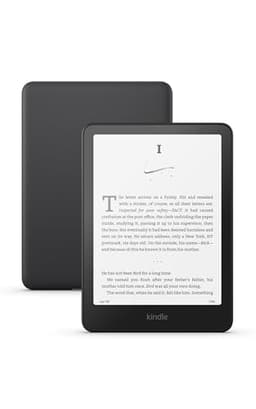
Kindle Paperwhite (newest model)
Need the Kindle itself, or buying a case as a gift to go with a new one? This is the current 7-inch 12th-gen Paperwhite — match any case to this exact model.
$129.99 on Amazon as of Nov 26, 2026 · price and availability may have changed
Check price on AmazonAffiliate link — TextToLab may earn a commission at no extra cost to you.
Best Cases for the Basic Kindle (6-inch)
The 2024 basic Kindle has a 6-inch screen — smaller than the Paperwhite — so Paperwhite cases do not fit it, and neither do cases for the old 10th-gen Kindle. A book-style folio with auto sleep is the natural choice; it's a cheap device, so a $12–15 case is plenty. Search by the 2024 model and the 6-inch size to avoid older look-alikes.
Scribe, Colorsoft, and Older Kindles
Kindle Scribe (11-inch). The Scribe is tablet-sized and comes with a pen, so you want a folio that holds the pen and props the device up for writing — a cover-plus-stand, not a reading flap. Buy one that explicitly fits the Scribe; nothing else comes close in size.
Kindle Colorsoft (7-inch). Same 7-inch footprint as the Paperwhite but a distinct model, so it needs a Colorsoft-specific case — a Paperwhite case is close but the camera-less cutouts and magnets don't line up. A clear back is popular here because it shows the color screen off.
Older models (Oasis, 10th-gen Kindle, 2021 Paperwhite). These are discontinued but still widely used. Cases are getting harder to find new, so search for your exact generation and buy sooner rather than later — a case for a current model will not fit a discontinued one.
Amazon's Official Covers vs Third-Party
You don't need the official cover, but there are two honest reasons to pay for it: the fit is guaranteed for your exact model, and the magnetic auto wake/sleep is tuned to work every time. Third-party folios match that for a third of the price when they're made for the right generation — the catch is only that fit and magnet quality vary, which is why the reviews matter.
| Amazon official | Third-party | |
|---|---|---|
| Typical price | $30–60 | $10–20 |
| Fit guarantee | Exact, by model | Depends on the listing |
| Auto wake/sleep | Consistent | Usually, check reviews |
| Styles / colors | A few | Hundreds |
Prices are typical ranges on Amazon as of November 2026 and move constantly, so we link to the live listings rather than quote a number that goes stale.
Kindle Case Questions, Answered
Will my old Kindle case fit the new Paperwhite?
Probably not. The 2024 Paperwhite is 7 inches; the 2021 Paperwhite was 6.8 inches. The newer one is physically bigger, so an older case is loose and the magnets can miss, breaking auto-sleep. Only cases listed for the 12th-generation (2024) Paperwhite are a true fit.
Does a case affect the Kindle's auto wake/sleep?
Only folio (front-flap) cases trigger auto wake/sleep, and only when their magnets line up with your model. A slim back-only case has no flap, so the screen stays on until the Kindle times out on its own — fine, just not automatic. If auto-sleep matters to you, buy a book-style case made for your exact model.
Do I need a case with a screen protector?
E-ink screens are glass and can crack or scratch, but a closed folio already shields the screen, so a separate protector is optional. If you use a slim back-only case and carry the Kindle loose in a bag, a matte protector is cheap insurance; with a book-style folio, most people skip it.
Are waterproof Kindle cases worth it?
The Paperwhite and Colorsoft are already IPX8 water resistant on their own, so a fully waterproof pouch is overkill for a bath or poolside unless you plan to actually submerge it. The 6-inch basic Kindle is not water resistant, so a splash-resistant sleeve makes more sense there.
Related Reading
- Kindle vs Kindle Paperwhite — which model to buy before you shop for a case
- Best E-Readers With Text-to-Speech — the readers that can read your books aloud
- Best Budget E-Reader — the cheapest Kindles and alternatives worth owning
- Gifts for Book Lovers — a case plus a reader or a subscription makes a complete gift
By TextToLab Research Team · Current Kindle lineup and screen sizes (basic 6", Paperwhite & Colorsoft 7", Scribe 11") verified November 2026 against Amazon's Kindle listings and current buying guides. Case fit is generation-specific — always confirm the "compatible with" line on the listing for your exact model.
As an Amazon Associate, TextToLab earns from qualifying purchases. The product links on this page are affiliate links — they cost you nothing and help fund our independent work.