The Quick Picks
If you want a book read aloud in a voice you can actually stand, here's the short version: ElevenReader is the best free option — 10 hours of listening per month with ElevenLabs voices, no payment required. Audible's 30-day trial is the free way to get a real human narrator — you keep one audiobook even if you cancel. And Speechify is the one app that can import the DRM-locked Kindle books you've already bought.
We ranked all seven apps below on three things: voice quality, price, and — the part most lists skip — which files each app can actually open. That last one matters because Amazon's DRM blocks most apps from reading Kindle purchases, which we explain in detail further down.
| App | Price | Best For | Kindle DRM? |
|---|---|---|---|
| ElevenReader | Free (10 hrs/mo); $8.25/mo unlimited | Best free option overall | No — DRM-free only |
| Audible | $14.95/mo (30-day free trial) | Real human narration | Own catalog (no TTS needed) |
| Speechify | $139/year | DRM-locked Kindle libraries | Yes (app/extension) |
| NaturalReader | $119/year (Plus) | Budget yearly plan, 100+ languages | No — DRM-free only |
| Voice Dream Reader | $14.99 one-time | iOS accessibility reading | No — DRM-free only |
| @Voice Aloud Reader | Free | Android, zero budget | Share-text workaround |
| Built-in TTS (iOS/Android/Kindle) | Free | Zero setup, zero cost | Assistive Reader works natively |
Want a real human narrator or an unlimited library instead of an AI voice? Audible and Kindle Unlimited are both free to start for 30 days — and Audible includes one audiobook you keep for good, even if you cancel:
Both trials are free for 30 days, cancel anytime. Affiliate links — TextToLab may earn a commission at no extra cost to you.
1. ElevenReader — Best Free App That Reads Books Aloud
Most "free" reading apps are trials in disguise. ElevenReader's free plan is the exception: 10 hours of text-to-audio per month with ElevenLabs voices — the same voices rated about 12% higher than Speechify's in blind comparisons — plus a library of 20,000+ free books with no hourly limits, 4x playback speed, bookmarks, and a sleep timer. For most people, 10 hours covers a book or two a month without spending anything.
It reads EPUBs, PDFs, and web articles you import, which makes it the best home for anything DRM-free: Project Gutenberg classics, Smashwords indie titles, technical books, and documents (if it's specifically PDFs you want read, here's every free way to read a PDF aloud). The one thing it can't do is open DRM-locked Kindle purchases — no app on this list can open those files directly, and only Speechify works around it (more on that below).
If you outgrow the free 10 hours, the Ultra plan at $8.25/month on annual billing removes the cap entirely. ElevenLabs has also built a catalog of 200,000 human-narrated audiobooks at $11/month — 26% cheaper than Audible's monthly rate — which we covered in our ElevenLabs news roundup.
Try ElevenReader Free — 10 Hours a Month
No credit card, no trial countdown. The free plan gives you 10 hours of listening per month with ElevenLabs voices, 20,000+ free books, 4x speed, and a sleep timer. If you like it, Ultra is $8.25/month (annual) for unlimited listening.
Get ElevenReader FreeAffiliate link — TextToLab may earn a commission at no extra cost to you.
2. Audible — When You Want a Real Human Narrator
Every other app on this list generates a voice on the fly. Audible is different: you're getting a professional performance recorded in a studio, and for fiction that difference is still audible in every line. Character voices, comic timing, emotional pacing — human narrators outperform every AI voice we've tested when the book is a novel you actually care about.
The trade-off is cost and catalog lock-in. Audible Premium Plus runs $14.95/month for one credit, and it only plays Audible's own titles — it won't read your PDFs, ebooks, or articles. The catalog is enormous (800,000+ titles), but if the book you want isn't in it, Audible can't help you. For the full cost math on reading versus listening, see our Kindle vs Audible breakdown. And if $14.95 feels steep, a cheaper subscription and every free option are ranked in the cheapest way to listen to audiobooks and Audible vs Everand.
Try Audible Free for 30 Days
The Premium Plus trial includes one free audiobook credit — any title in the catalog, and it's yours to keep even if you cancel. It's the cheapest way to hear what a professional narrator adds before paying anything.
Start Audible Free TrialAffiliate link — TextToLab may earn a commission at no extra cost to you.
3. Speechify — The Only App That Imports Your Kindle Library
Speechify earns its spot on this list for one specific capability: it's the only third-party app that connects to your Amazon account and pulls in the DRM-locked Kindle books you've already purchased. On iOS, you import your Kindle Library from the app's Add tab; in a browser, the Chrome extension reads Kindle Cloud Reader pages aloud directly. Premium also gets you 30+ HD voices, speeds up to 4.5x, and offline listening.
The honest caveats: it costs $139/year, which is the most expensive subscription here, and in our testing its voices scored slightly below ElevenReader's in blind comparisons. If your library is mostly DRM-free, you don't need it — ElevenReader does the same job with better-rated voices for free. Speechify makes sense specifically when you have years of Kindle purchases you want read aloud in one app. Before committing, read our Speechify pricing guide — and if the price is the sticking point, we've compared 7 Speechify alternatives that are cheaper or free.
4. NaturalReader — The Budget Yearly Subscription
NaturalReader's Personal plans — Plus at $119/year or Pro at $159/year — undercut Speechify's $139/year at the Plus tier while supporting more languages (100+ versus Speechify's 60+). Its trick is licensing voices from Google, OpenAI, and ElevenLabs, so you get a curated selection from multiple providers instead of one company's voice engine. It reads web pages, PDFs, and DRM-free ebooks across web, desktop, and a Chrome extension.
In our testing, its voice quality landed at 7/10 versus Speechify's 8/10 — a difference that's negligible for most reading. There's also a free plan with 20 minutes per day of basic non-AI voices, which is enough to test the interface but too robotic for real listening. No Kindle DRM integration — for Kindle purchases you'd combine Amazon's web reader with the NaturalReader Chrome extension. Full plan-by-plan breakdown in our NaturalReader pricing guide.
5. Voice Dream Reader — The iOS One-Time Purchase
Voice Dream Reader is the app the accessibility community has recommended for years, and the pricing model is the headline: $14.99 one-time on iOS, not another subscription. That's less than two months of Audible for an app you keep forever, with optional voice packs available if you want higher-quality voices than the defaults.
It imports EPUB files directly and gives you deep control over reading — the kind of fine-grained speed, pronunciation, and visual tracking options built for people who rely on TTS daily rather than casually. The limitations: it's iOS-only, and like everything except Speechify, it has no Kindle integration — you need DRM-free files. If you buy from indie stores or read Project Gutenberg, it's arguably the best value on this list.
6. @Voice Aloud Reader — Free on Android
@Voice Aloud Reader is the Android tinkerer's option: free, and able to read text from practically any app on your phone. Open a book or article, select the text, and share it to @Voice — it queues up and reads aloud using your device's TTS engine. It also opens DRM-free ebook and document files directly.
The experience is clunky. The interface looks dated, the share-to-read workflow adds friction, and because it uses your device's built-in TTS engine, voice quality depends entirely on what's installed on your phone — expect Google Assistant quality, not ElevenLabs quality. But it's free, it works, and for Android users with zero budget it beats paying for features you'll rarely use.
7. The Built-In Free Options You Already Have
Before installing anything, know what your devices already do for free:
- iOS Speak Screen. Turn it on under Settings > Accessibility > Spoken Content, then swipe down from the top of the screen with two fingers in any app. It reads the whole page and auto-turns — the best free hack for Kindle books because it reads the rendered screen, not the file. Download the "Enhanced" voice for your language in the same settings menu; it sounds noticeably better and costs nothing.
- Android Select to Speak. Under Settings > Accessibility, this reads any text you tap. Page turning is less reliable than iOS's equivalent, but it's free and works in any app.
- Kindle Assistive Reader. Built into the Kindle app (iOS, Android, Fire tablet) and 11th-generation-and-newer Kindle e-readers via Bluetooth. Free, works natively with most Kindle Store books that have Enhanced Typesetting, but the voice is basic OS-level TTS and it supports only 5 languages. Our Kindle text-to-speech guide walks through enabling it on every device.
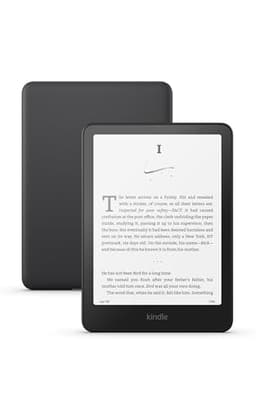
Kindle Paperwhite (newest model)
The current Paperwhite is the cheapest dedicated reader that supports Assistive Reader natively — pair Bluetooth headphones and any TTS-enabled Kindle book reads aloud, no phone required.
Check price on AmazonAffiliate link — TextToLab may earn a commission at no extra cost to you.
The common thread: all of these use your device's built-in TTS engine, so they sound functional rather than pleasant. They're the right answer for occasional listening; if you listen for hours, the voice quality is why the apps above exist.
Why No App Can Open Your Kindle Files Directly
The DRM Reality Check
Books you buy from the Kindle Store are stored as .azw or .kfx files locked with Amazon's DRM. You cannot drag those files into ElevenReader, NaturalReader, Voice Dream, or any other app — the encryption prevents it, by design. The two legitimate ways around it: Speechify connects to your Amazon account through its own app (or reads Kindle Cloud Reader pages via its Chrome extension), and screen-reading tools like iOS Speak Screen read the rendered text off your display rather than the file. DRM-free books — Project Gutenberg, Smashwords, most indie and technical publishers — come as plain EPUB or PDF and work in every app on this list.
How to Choose: Match the App to Your Situation
You want free, and your books are ebooks, PDFs, or articles
ElevenReader. Ten free hours a month with the best-rated voices in this roundup, plus 20,000+ free books. There's no cheaper way to get listening this good.
Your library is mostly Kindle purchases
Start free with Kindle's built-in Assistive Reader (see our step-by-step guide). If the robotic voice wears you down, Speechify at $139/year is the only app that imports your DRM-locked library with premium voices.
It's fiction and you want the best listening experience
Audible. Human narration still wins for novels, and the 30-day trial includes a free audiobook you keep. AI voices are catching up fast for non-fiction, but they're not there yet for character-driven stories.
You hate subscriptions
Voice Dream Reader on iOS: $14.99 once. On Android, @Voice Aloud Reader is free. Both need DRM-free files, so pair them with Project Gutenberg or indie bookstores rather than the Kindle Store.
You read in multiple languages, on a budget
NaturalReader Plus ($119/year) supports 100+ languages — more than Speechify — and pulls voices from Google, OpenAI, and ElevenLabs. Check the pricing breakdown first; the Personal and Commercial products are separate subscriptions.
You want to create audiobook files, not just listen
Different tool category entirely — you need a TTS generator with downloadable audio, not a reading app. Our best TTS for audiobooks guide ranks 7 AI narrators for long-form production.
The Bottom Line
Most people should start with ElevenReader's free plan — it costs nothing to find out whether 10 hours a month and 20,000+ free books cover your listening. Add an Audible trial for the one novel you most want narrated properly (the trial book is free and yours to keep). Pay for Speechify only if importing a DRM-locked Kindle library is the specific problem you need solved — it's the one thing nothing else on this list does.
And before paying for anything, spend five minutes with the free options built into your phone. For plenty of readers, iOS Speak Screen or Kindle's Assistive Reader is genuinely enough.
Both trials are free for 30 days, cancel anytime. Affiliate links — TextToLab may earn a commission at no extra cost to you.
Related Reading
- How to Listen to Audiobooks for Free — every legit free route, from library apps to trial keepers
- How to Read a PDF Aloud (Free) — every built-in method by device, plus the best free app
- Does Kindle Read to You? — the yes/no answer by device, and how to turn on read-aloud
- Kindle Text to Speech — how to make every Kindle device and app read aloud, step by step
- Best Audiobook App 2026 — human-narrated audiobook apps ranked, the counterpart to these read-aloud tools
- Kindle vs Audible — the full cost math on reading vs listening, and when each wins
- Best E-Readers With Text-to-Speech — which e-ink devices actually read aloud, if you want hardware not an app
- 7 Speechify Alternatives — cheaper and free reading apps compared in depth
- Best TTS for Audiobooks — 7 AI narrators ranked for long-form listening and production
- ElevenLabs in 2026 — the ElevenReader launch, 200K audiobooks at $11/month, and what it means for readers
By TextToLab Research Team · Pricing and plan details verified August 2026 against each vendor's published pricing pages and our own deep-dive reviews.
As an Amazon Associate, TextToLab earns from qualifying purchases. Some links on this page are affiliate links — they cost you nothing and help fund our independent testing.